Monday, 18 March 2013

FILES

Last chapter explained about standard input and output devices handled by C programming language. This chapter we will see how C programmers can create, open, close text or binary files for their data storage.
A file represents a sequence of bytes, does not matter if it is a text file or binary file. C programming language provides access on high level functions as well as low level (OS level) calls to handle file on your storage devices. This chapter will take you through important calls for the file management.

Opening Files

You can use the fopen( ) function to create a new file or to open an existing file, this call will initialize an object of the type FILE, which contains all the information necessary to control the stream. Following is the prototype of this function call:
FILE *fopen( const char * filename, const char * mode );
Here filename is string literal which you will use to name your file and access mode can have one of the following values:
ModeDescription
rOpens an existing text file for reading purpose.
wOpens a text file for writing, if it does not exist then a new file is created. Here your program will start writing content from the beginning of the file.
aOpens a text file for writing in appending mode, if it does not exist then a new file is created. Here your program will start appending content in the existing file content.
r+Opens a text file for reading and writing both.
w+Opens a text file for reading and writing both. It first truncate the file to zero length if it exists otherwise create the file if it does not exist.
a+Opens a text file for reading and writing both. It creates the file if it does not exist. The reading will start from the beginning but writing can only be appended.
If you are going to handle binary files then you will use below mentioned access modes instead of the above mentioned:
"rb", "wb", "ab", "ab+", "a+b", "wb+", "w+b", "ab+", "a+b"

Closing a File

To close a file, use the fclose( ) function. The prototype of this function is:
 int fclose( FILE *fp );
The fclose( ) function returns zero on success, or EOF if there is an error in closing the file. This function actually, flushes any data still pending in the buffer to the file, closes the file, and releases any memory used for the file. The EOF is a constant defined in the header file stdio.h.
There are various functions provide by C standard library to read and write a file character by character or in the form of a fixed length string. Let us see few of the in the next section.

Writing a File

Following is the simplest function to write individual characters to a stream:
int fputc( int c, FILE *fp );
The function fputc() writes the character value of the argument c to the output stream referenced by fp. It returns the written character written on success otherwise EOF if there is an error. You can use the following functions to write a null-terminated string to a stream:
int fputs( const char *s, FILE *fp );
The function fputs() writes the string s to the output stream referenced by fp. It returns a non-negative value on success, otherwise EOF is returned in case of any error. You can use int fprintf(FILE *fp,const char *format, ...) function as well to write a string into a file. Try the following example:
#include <stdio.h>

main()
{
   FILE *fp;

   fp = fopen("/tmp/test.txt", "w+");
   fprintf(fp, "This is testing for fprintf...\n");
   fputs("This is testing for fputs...\n", fp);
   fclose(fp);
}
When the above code is compiled and executed, it creates a new file test.txt in /tmp directory and writes two lines using two different functions. Let us read this file in next section.

Reading a File

Following is the simplest function to read a single character from a file:
int fgetc( FILE * fp );
The fgetc() function reads a character from the input file referenced by fp. The return value is the character read, or in case of any error it returns EOF. The following functions allow you to read a string from a stream:
char *fgets( char *buf, int n, FILE *fp );
The functions fgets() reads up to n - 1 characters from the input stream referenced by fp. It copies the read string into the buffer buf, appending a null character to terminate the string.
If this function encounters a newline character '\n' or the end of the file EOF before they have read the maximum number of characters, then it returns only the characters read up to that point including new line character. You can also use int fscanf(FILE *fp, const char *format, ...) function to read strings from a file but it stops reading after the first space character encounters.
#include <stdio.h>

main()
{
   FILE *fp;
   char buff[100];

   fp = fopen("/tmp/test.txt", "r");
   fscanf(fp, "%s", buff);
   printf("1 : %s\n", buff );

   fgets(buff, 255, (FILE*)fp);
   printf("2: %s\n", buff );
   
   fgets(buff, 255, (FILE*)fp);
   printf("3: %s\n", buff );
   fclose(fp);

}
When the above code is compiled and executed, it reads the file created in previous section and produces following result:
1 : This
2: is testing for fprintf...

3: This is testing for fputs...
Let's see a little more detail about what happened here. First fscanf() method read just This because after that it encountered a space, second call is for fgets() which read the remaining line till it encountered end of line. Finally last call fgets() read second line completely.

Binary I/O Functions

There are following two functions which can be used for binary input and output:
size_t fread(void *ptr, size_t size_of_elements, 
             size_t number_of_elements, FILE *a_file);
              
size_t fwrite(const void *ptr, size_t size_of_elements, 
             size_t number_of_elements, FILE *a_file);
Both of these functions should be used to read or write blocks of memories - usually arrays or structures.

STRUCTURES

C arrays allow you to define type of variables that can hold several data items of the same kind but structure is another user defined data type available in C programming, which allows you to combine data items of different kinds.
Structures are used to represent a record, Suppose you want to keep track of your books in a library. You might want to track the following attributes about each book:
  • Title
  • Author
  • Subject
  • Book ID

Defining a Structure

To define a structure, you must use the struct statement. The struct statement defines a new data type, with more than one member for your program. The format of the struct statement is this:
struct [structure tag]
{
   member definition;
   member definition;
   ...
   member definition;
} [one or more structure variables];  
The structure tag is optional and each member definition is a normal variable definition, such as int i; or float f; or any other valid variable definition. At the end of the structure's definition, before the final semicolon, you can specify one or more structure variables but it is optional. Here is the way you would declare the Book structure:
struct Books
{
   char  title[50];
   char  author[50];
   char  subject[100];
   int   book_id;
} book;  

Accessing Structure Members

To access any member of a structure, we use the member access operator (.). The member access operator is coded as a period between the structure variable name and the structure member that we wish to access. You would use struct keyword to define variables of structure type. Following is the example to explain usage of structure:
#include <stdio.h>
#include <string.h>
 
struct Books
{
   char  title[50];
   char  author[50];
   char  subject[100];
   int   book_id;
};
 
int main( )
{
   struct Books Book1;        /* Declare Book1 of type Book */
   struct Books Book2;        /* Declare Book2 of type Book */
 
   /* book 1 specification */
   strcpy( Book1.title, "C Programming");
   strcpy( Book1.author, "Nuha Ali"); 
   strcpy( Book1.subject, "C Programming Tutorial");
   Book1.book_id = 6495407;

   /* book 2 specification */
   strcpy( Book2.title, "Telecom Billing");
   strcpy( Book2.author, "Zara Ali");
   strcpy( Book2.subject, "Telecom Billing Tutorial");
   Book2.book_id = 6495700;
 
   /* print Book1 info */
   printf( "Book 1 title : %s\n", Book1.title);
   printf( "Book 1 author : %s\n", Book1.author);
   printf( "Book 1 subject : %s\n", Book1.subject);
   printf( "Book 1 book_id : %d\n", Book1.book_id);

   /* print Book2 info */
   printf( "Book 2 title : %s\n", Book2.title);
   printf( "Book 2 author : %s\n", Book2.author);
   printf( "Book 2 subject : %s\n", Book2.subject);
   printf( "Book 2 book_id : %d\n", Book2.book_id);

   return 0;
}
When the above code is compiled and executed, it produces following result:
Book 1 title : C Programming
Book 1 author : Nuha Ali
Book 1 subject : C Programming Tutorial
Book 1 book_id : 6495407
Book 2 title : Telecom Billing
Book 2 author : Zara Ali
Book 2 subject : Telecom Billing Tutorial
Book 2 book_id : 6495700

Structures as Function Arguments

You can pass a structure as a function argument in very similar way as you pass any other variable or pointer. You would access structure variables in the similar way as you have accessed in the above example:
#include <stdio.h>
#include <string.h>
 
struct Books
{
   char  title[50];
   char  author[50];
   char  subject[100];
   int   book_id;
};

/* function declaration */
void printBook( struct Books book );
int main( )
{
   struct Books Book1;        /* Declare Book1 of type Book */
   struct Books Book2;        /* Declare Book2 of type Book */
 
   /* book 1 specification */
   strcpy( Book1.title, "C Programming");
   strcpy( Book1.author, "Nuha Ali"); 
   strcpy( Book1.subject, "C Programming Tutorial");
   Book1.book_id = 6495407;

   /* book 2 specification */
   strcpy( Book2.title, "Telecom Billing");
   strcpy( Book2.author, "Zara Ali");
   strcpy( Book2.subject, "Telecom Billing Tutorial");
   Book2.book_id = 6495700;
 
   /* print Book1 info */
   printBook( Book1 );

   /* Print Book2 info */
   printBook( Book2 );

   return 0;
}
void printBook( struct Books book )
{
   printf( "Book title : %s\n", book.title);
   printf( "Book author : %s\n", book.author);
   printf( "Book subject : %s\n", book.subject);
   printf( "Book book_id : %d\n", book.book_id);
}
When the above code is compiled and executed, it produces following result:
Book title : C Programming
Book author : Nuha Ali
Book subject : C Programming Tutorial
Book book_id : 6495407
Book title : Telecom Billing
Book author : Zara Ali
Book subject : Telecom Billing Tutorial
Book book_id : 6495700

Pointers to Structures

You can define pointers to structures in very similar way as you define pointer to any other variable as follows:
struct Books *struct_pointer;
Now you can store the address of a structure variable in the above defined pointer variable. To find the address of a structure variable, place the & operator before the structure's name as follows:
struct_pointer = &Book1;
To access the members of a structure using a pointer to that structure, you must use the -> operator as follows:
struct_pointer->title;
Let us re-write above example using structure pointer, hope this will be easy for you to understand the concept:
#include <stdio.h>
#include <string.h>
 
struct Books
{
   char  title[50];
   char  author[50];
   char  subject[100];
   int   book_id;
};

/* function declaration */
void printBook( struct Books *book );
int main( )
{
   struct Books Book1;        /* Declare Book1 of type Book */
   struct Books Book2;        /* Declare Book2 of type Book */
 
   /* book 1 specification */
   strcpy( Book1.title, "C Programming");
   strcpy( Book1.author, "Nuha Ali"); 
   strcpy( Book1.subject, "C Programming Tutorial");
   Book1.book_id = 6495407;

   /* book 2 specification */
   strcpy( Book2.title, "Telecom Billing");
   strcpy( Book2.author, "Zara Ali");
   strcpy( Book2.subject, "Telecom Billing Tutorial");
   Book2.book_id = 6495700;
 
   /* print Book1 info by passing address of Book1 */
   printBook( &Book1 );

   /* print Book2 info by passing address of Book2 */
   printBook( &Book2 );

   return 0;
}
void printBook( struct Books *book )
{
   printf( "Book title : %s\n", book->title);
   printf( "Book author : %s\n", book->author);
   printf( "Book subject : %s\n", book->subject);
   printf( "Book book_id : %d\n", book->book_id);
}
When the above code is compiled and executed, it produces following result:
Book title : C Programming
Book author : Nuha Ali
Book subject : C Programming Tutorial
Book book_id : 6495407
Book title : Telecom Billing
Book author : Zara Ali
Book subject : Telecom Billing Tutorial
Book book_id : 6495700

STRINGS

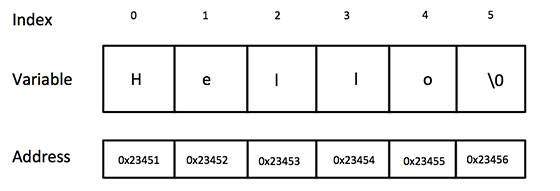
The string in C programming language is actually a one-dimensional array of characters which is terminated by a null character '\0'. Thus a null-terminated string contains the characters that comprise the string followed by a null.
The following declaration and initialization create a string consisting of the word "Hello". To hold the null character at the end of the array, the size of the character array containing the string is one more than the number of characters in the word "Hello."
char greeting[6] = {'H', 'e', 'l', 'l', 'o', '\0'};
If you follow the rule of array initialization then you can write the above statement as follows:
char greeting[] = "Hello";
Following is the memory presentation of above defined string in C/C++:
String Presentation in C/C++ Actually, you do not place the null character at the end of a string constant. The C compiler automatically places the '\0' at the end of the string when it initializes the array. Let us try to print above mentioned string:
#include <stdio.h>

int main ()
{
   char greeting[6] = {'H', 'e', 'l', 'l', 'o', '\0'};

   printf("Greeting message: %s\n", greeting );

   return 0;
}
When the above code is compiled and executed, it produces result something as follows:
Greeting message: Hello
C supports a wide range of functions that manipulate null-terminated strings:
S.N.Function & Purpose
1strcpy(s1, s2);
Copies string s2 into string s1.
2strcat(s1, s2);
Concatenates string s2 onto the end of string s1.
3strlen(s1);
Returns the length of string s1.
4strcmp(s1, s2);
Returns 0 if s1 and s2 are the same; less than 0 if s1<s2; greater than 0 if s1>s2.
5strchr(s1, ch);
Returns a pointer to the first occurrence of character ch in string s1.
6strstr(s1, s2);
Returns a pointer to the first occurrence of string s2 in string s1.
Following example makes use of few of the above mentioned functions:
#include <stdio.h>
#include <string.h>

int main ()
{
   char str1[10] = "Hello";
   char str2[10] = "World";
   char str3[10];
   int  len ;

   /* copy str1 into str3 */
   strcpy(str3, str1);
   printf("strcpy( str3, str1) :  %s\n", str3 );

   /* concatenates str1 and str2 */
   strcat( str1, str2);
   printf("strcat( str1, str2):   %s\n", str1 );

   /* total lenghth of str1 after concatenation */
   len = strlen(str1);
   printf("strlen(str1) :  %d\n", len );

   return 0;
}
When the above code is compiled and executed, it produces result something as follows:
strcpy( str3, str1) :  Hello
strcat( str1, str2):   HelloWorld
strlen(str1) :  10
You can find a complete list of c string related functions in C Standard Library.

POINTERS

Pointers in C are easy and fun to learn. Some C programming tasks are performed more easily with pointers, and other tasks, such as dynamic memory allocation, cannot be performed without using pointers. So it becomes necessary to learn pointers to become a perfect C programmer. Let's start learning them in simple and easy steps.
As you know every variable is a memory location and every memory location has its address defined which can be accessed using ampersand (&) operator which denotes an address in memory. Consider the following example which will print the address of the variables defined:
#include <stdio.h>

int main ()
{
   int  var1;
   char var2[10];

   printf("Address of var1 variable: %x\n", &var1  );
   printf("Address of var2 variable: %x\n", &var2  );

   return 0;
}
When the above code is compiled and executed, it produces result something as follows:
Address of var1 variable: bff5a400
Address of var2 variable: bff5a3f6
So you understood what is memory address and how to access it, so base of the concept is over. Now let us see what is a pointer.

What Are Pointers?

A pointer is a variable whose value is the address of another variable ie. direct address of the memory location. Like any variable or constant, you must declare a pointer before you can use it to store any variable address. The general form of a pointer variable declaration is:
type *var-name;
Here, type is the pointer's base type; it must be a valid C data type and var-name is the name of the pointer variable. The asterisk * you used to declare a pointer is the same asterisk that you use for multiplication. However, in this statement the asterisk is being used to designate a variable as a pointer. Following are the valid pointer declaration:
int    *ip;    /* pointer to an integer */
double *dp;    /* pointer to a double */
float  *fp;    /* pointer to a float */
char   *ch     /* pointer to a character */
The actual data type of the value of all pointers, whether integer, float, character, or otherwise, is the same, a long hexadecimal number that represents a memory address. The only difference between pointers of different data types is the data type of the variable or constant that the pointer points to.

How to use Pointers?

There are few important operations which we will do with the help of pointers very frequently. (a) we define a pointer variables (b) assign the address of a variable to a pointer and (c) finally access the value at the address available in the pointer variable. This is done by using unary operator * that returns the value of the variable located at the address specified by its operand. Following example makes use of these operations:
#include <stdio.h>

int main ()
{
   int  var = 20;   /* actual variable declaration */
   int  *ip;        /* pointer variable declaration */

   ip = &var;  /* store address of var in pointer variable*/

   printf("Address of var variable: %x\n", &var  );

   /* address stored in pointer variable */
   printf("Address stored in ip variable: %x\n", ip );

   /* access the value using the pointer */
   printf("Value of *ip variable: %d\n", *ip );

   return 0;
}
When the above code is compiled and executed, it produces result something as follows:
Address of var variable: bffd8b3c
Address stored in ip variable: bffd8b3c
Value of *ip variable: 20

NULL Pointers in C

It is always a good practice to assign a NULL value to a pointer variable in case you do not have exact address to be assigned. This is done at the time of variable declaration. A pointer that is assigned NULL is called a null pointer.
The NULL pointer is a constant with a value of zero defined in several standard libraries. Consider the following program:
#include <stdio.h>

int main ()
{
   int  *ptr = NULL;

   printf("The value of ptr is : %x\n", ptr  );
 
   return 0;
}
When the above code is compiled and executed, it produces following result:
The value of ptr is 0
On most of the operating systems, programs are not permitted to access memory at address 0 because that memory is reserved by the operating system. However, the memory address 0 has special significance; it signals that the pointer is not intended to point to an accessible memory location. But by convention, if a pointer contains the null (zero) value, it is assumed to point to nothing.
To check for a null pointer you can use an if statement as follows:
if(ptr)     /* succeeds if p is not null */
if(!ptr)    /* succeeds if p is null */

C Pointers in Detail:

Pointers have many but easy concepts and they are very important to C programming. There are following few important pointer concepts which should be clear to a C programmer:

C - Pointer arithmetic


As explained in main chapter, C pointer is an address which is a numeric value. Therefore, you can perform arithmetic operations on a pointer just as you can a numeric value. There are four arithmetic operators that can be used on pointers: ++, --, +, and -
To understand pointer arithmetic, let us consider that ptr is an integer pointer which points to the address 1000. Assuming 32-bit integers, let us perform the following arithmetic operation on the pointer:
ptr++
Now after the above operation, the ptr will point to the location 1004 because each time ptr is incremented, it will point to the next integer location which is 4 bytes next to the current location. This operation will move the pointer to next memory location without impacting actual value at the memory location. If ptr points to a character whose address is 1000, then above operation will point to the location 1001 because next character will be available at 1001.

Incrementing a Pointer

We prefer using a pointer in our program instead of an array because the variable pointer can be incremented, unlike the array name which cannot be incremented because it is a constant pointer. The following program increments the variable pointer to access each succeeding element of the array:
#include <stdio.h>

const int MAX = 3;

int main ()
{
   int  var[] = {10, 100, 200};
   int  i, *ptr;

   /* let us have array address in pointer */
   ptr = var;
   for ( i = 0; i < MAX; i++)
   {

      printf("Address of var[%d] = %x\n", i, ptr );
      printf("Value of var[%d] = %d\n", i, *ptr );

      /* move to the next location */
      ptr++;
   }
   return 0;
}
When the above code is compiled and executed, it produces result something as follows:
Address of var[0] = bf882b30
Value of var[0] = 10
Address of var[1] = bf882b34
Value of var[1] = 100
Address of var[2] = bf882b38
Value of var[2] = 200

Decrementing a Pointer

The same considerations apply to decrementing a pointer, which decreases its value by the number of bytes of its data type as shown below:
#include <stdio.h>

const int MAX = 3;

int main ()
{
   int  var[] = {10, 100, 200};
   int  i, *ptr;

   /* let us have array address in pointer */
   ptr = &var[MAX-1];
   for ( i = MAX; i > 0; i--)
   {

      printf("Address of var[%d] = %x\n", i, ptr );
      printf("Value of var[%d] = %d\n", i, *ptr );

      /* move to the previous location */
      ptr--;
   }
   return 0;
}
When the above code is compiled and executed, it produces result something as follows:
Address of var[3] = bfedbcd8
Value of var[3] = 200
Address of var[2] = bfedbcd4
Value of var[2] = 100
Address of var[1] = bfedbcd0
Value of var[1] = 10

Pointer Comparisons

Pointers may be compared by using relational operators, such as ==, <, and >. If p1 and p2 point to variables that are related to each other, such as elements of the same array, then p1 and p2 can be meaningfully compared.
The following program modifies the previous example one by incrementing the variable pointer so long as the address to which it points is either less than or equal to the address of the last element of the array, which is &var[MAX - 1]:
#include <stdio.h>

const int MAX = 3;

int main ()
{
   int  var[] = {10, 100, 200};
   int  i, *ptr;

   /* let us have address of the first element in pointer */
   ptr = var;
   i = 0;
   while ( ptr <= &var[MAX - 1] )
   {

      printf("Address of var[%d] = %x\n", i, ptr );
      printf("Value of var[%d] = %d\n", i, *ptr );

      /* point to the previous location */
      ptr++;
      i++;
   }
   return 0;
}
When the above code is compiled and executed, it produces result something as follows:
Address of var[0] = bfdbcb20
Value of var[0] = 10
Address of var[1] = bfdbcb24
Value of var[1] = 100
Address of var[2] = bfdbcb28
Value of var[2] = 200
 

C - Array of pointers


Before we understand the concept of arrays of pointers, let us consider the following example which makes use of an array of 3 integers:
#include <stdio.h>
 
const int MAX = 3;
 
int main ()
{
   int  var[] = {10, 100, 200};
   int i;
 
   for (i = 0; i < MAX; i++)
   {
      printf("Value of var[%d] = %d\n", i, var[i] );
   }
   return 0;
}
When the above code is compiled and executed, it produces following result:
Value of var[0] = 10
Value of var[1] = 100
Value of var[2] = 200
There may be a situation when we want to maintain an array which can store pointers to an int or char or any other data type available. Following is the declaration of an array of pointers to an integer:
int *ptr[MAX];
This declares ptr as an array of MAX integer pointers. Thus, each element in ptr, now holds a pointer to an int value. Following example makes use of three integers which will be stored in an array of pointers as follows:
#include <stdio.h>
 
const int MAX = 3;
 
int main ()
{
   int  var[] = {10, 100, 200};
   int i, *ptr[MAX];
 
   for ( i = 0; i < MAX; i++)
   {
      ptr[i] = &var[i]; /* assign the address of integer. */
   }
   for ( i = 0; i < MAX; i++)
   {
      printf("Value of var[%d] = %d\n", i, *ptr[i] );
   }
   return 0;
}
When the above code is compiled and executed, it produces following result:
Value of var[0] = 10
Value of var[1] = 100
Value of var[2] = 200
You can also use an array of pointers to character to store a list of strings as follows:
#include <stdio.h>
 
const int MAX = 4;
 
int main ()
{
   char *names[] = {
                   "Zara Ali",
                   "Hina Ali",
                   "Nuha Ali",
                   "Sara Ali",
   };
   int i = 0;

   for ( i = 0; i < MAX; i++)
   {
      printf("Value of names[%d] = %s\n", i, names[i] );
   }
   return 0;
}
When the above code is compiled and executed, it produces following result:
Value of names[0] = Zara Ali
Value of names[1] = Hina Ali
Value of names[2] = Nuha Ali
Value of names[3] = Sara Ali 
 

C - Pointer to Pointer

 
A pointer to a pointer is a form of multiple indirection, or a chain of pointers. Normally, a pointer contains the address of a variable. When we define a pointer to a pointer, the first pointer contains the address of the second pointer, which points to the location that contains the actual value as shown below.
Pointer to Pointer in C A variable that is a pointer to a pointer must be declared as such. This is done by placing an additional asterisk in front of its name. For example, following is the declaration to declare a pointer to a pointer of type int:
int **var; When a target value is indirectly pointed to by a pointer to a pointer, accessing that value requires that the asterisk operator be applied twice, as is shown below in the example:
#include <stdio.h>  
int main ()  
{  
int var; int *ptr; int **pptr; var = 3000; 
 /* take the address of var */ ptr = &var; 
 /* take the address of ptr using address of operator & */ pptr = &ptr; 
 /* take the value using pptr */ printf("Value of var = %d\n", var ); 
printf("Value available at *ptr = %d\n", *ptr ); 
printf("Value available at **pptr = %d\n", **pptr); return 0; 
 }
When the above code is compiled and executed, it produces following result:
Value of var = 3000 Value available at *ptr = 3000 Value available at **pptr = 3000

Passing pointers to functions in C

C programming language allows you to pass a pointer to a function. To do so, simply declare the function parameter as a pointer type.
Following a simple example where we pass an unsigned long pointer to a function and change the value inside the function which reflects back in the calling function:
#include <stdio.h>
#include <time.h>
 
void getSeconds(unsigned long *par);

int main ()
{
   unsigned long sec;


   getSeconds( &sec );

   /* print the actual value */
   printf("Number of seconds: %ld\n", sec );

   return 0;
}

void getSeconds(unsigned long *par)
{
   /* get the current number of seconds */
   *par = time( NULL );
   return;
}
When the above code is compiled and executed, it produces following result:
Number of seconds :1294450468
The function which can accept a pointer, can also accept an array as shown in the following example:
#include <stdio.h>
 
/* function declaration */
double getAverage(int *arr, int size);
 
int main ()
{
   /* an int array with 5 elements */
   int balance[5] = {1000, 2, 3, 17, 50};
   double avg;
 
   /* pass pointer to the array as an argument */
   avg = getAverage( balance, 5 ) ;
 
   /* output the returned value  */
   printf("Average value is: %f\n", avg );
    
   return 0;
}

double getAverage(int *arr, int size)
{
  int    i, sum = 0;       
  double avg;          
 
  for (i = 0; i < size; ++i)
  {
    sum += arr[i];
  }
 
  avg = (double)sum / size;
 
  return avg;
}
When the above code is compiled together and executed, it produces following result:
Average value is: 214.40000 
 

Return pointer from functions in C

As we have seen in last chapter how C programming language allows to return an array from a function, similar way C allows you to return a pointer from a function. To do so, you would have to declare a function returning a pointer as in the following example:
int * myFunction()
{
.
.
.
}
Second point to remember is that, it is not good idea to return the address of a local variable to outside of the function so you would have to define the local variable as static variable.
Now consider the following function which will generate 10 random numbers and return them using an array name which represents a pointer ie address of first array element.
#include <stdio.h>
#include <time.h>
 
/* function to generate and retrun random numbers. */
int * getRandom( )
{
   static int  r[10];
   int i;
 
   /* set the seed */
   srand( (unsigned)time( NULL ) );
   for ( i = 0; i < 10; ++i)
   {
      r[i] = rand();
      printf("%d\n", r[i] );
   }
 
   return r;
}
 
/* main function to call above defined function */
int main ()
{
   /* a pointer to an int */
   int *p;
   int i;

   p = getRandom();
   for ( i = 0; i < 10; i++ )
   {
       printf("*(p + [%d]) : %d\n", i, *(p + i) );
   }
 
   return 0;
}
When the above code is compiled together and executed, it produces result something as follows:
1523198053
1187214107
1108300978
430494959
1421301276
930971084
123250484
106932140
1604461820
149169022
*(p + [0]) : 1523198053
*(p + [1]) : 1187214107
*(p + [2]) : 1108300978
*(p + [3]) : 430494959
*(p + [4]) : 1421301276
*(p + [5]) : 930971084
*(p + [6]) : 123250484
*(p + [7]) : 106932140
*(p + [8]) : 1604461820
*(p + [9]) : 149169022


ARRAYS

ore useful to think of an array as a collection of variables of the same type.
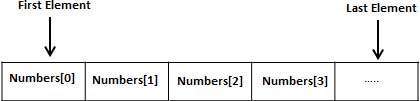
Instead of declaring individual variables, such as number0, number1, ..., and number99, you declare one array variable such as numbers and use numbers[0], numbers[1], and ..., numbers[99] to represent individual variables. A specific element in an array is accessed by an index.
All arrays consist of contiguous memory locations. The lowest address corresponds to the first element and the highest address to the last element.
Arrays in C

Declaring Arrays

To declare an array in C, a programmer specifies the type of the elements and the number of elements required by an array as follows:
type arrayName [ arraySize ];
This is called a single-dimensional array. The arraySize must be an integer constant greater than zero and type can be any valid C data type. For example, to declare a 10-element array called balance of type double, use this statement:
double balance[10];
Now balance is avariable array which is sufficient to hold upto 10 double numbers.

Initializing Arrays

You can initialize array in C either one by one or using a single statement as follows:
double balance[5] = {1000.0, 2.0, 3.4, 17.0, 50.0};
The number of values between braces { } can not be larger than the number of elements that we declare for the array between square brackets [ ]. Following is an example to assign a single element of the array:
If you omit the size of the array, an array just big enough to hold the initialization is created. Therefore, if you write:
double balance[] = {1000.0, 2.0, 3.4, 17.0, 50.0};
You will create exactly the same array as you did in the previous example.
balance[4] = 50.0;
The above statement assigns element number 5th in the array a value of 50.0. Array with 4th index will be 5th ie. last element because all arrays have 0 as the index of their first element which is also called base index. Following is the pictorial representation of the same array we discussed above:
Array Presentation

Accessing Array Elements

An element is accessed by indexing the array name. This is done by placing the index of the element within square brackets after the name of the array. For example:
double salary = balance[9];
The above statement will take 10th element from the array and assign the value to salary variable. Following is an example which will use all the above mentioned three concepts viz. declaration, assignment and accessing arrays:
#include <stdio.h>
 
int main ()
{
   int n[ 10 ]; /* n is an array of 10 integers */
   int i,j;
 
   /* initialize elements of array n to 0 */         
   for ( i = 0; i < 10; i++ )
   {
      n[ i ] = i + 100; /* set element at location i to i + 100 */
   }
   
   /* output each array element's value */
   for (j = 0; j < 10; j++ )
   {
      printf("Element[%d] = %d\n", j, n[j] );
   }
 
   return 0;
}
When the above code is compiled and executed, it produces following result:
Element[0] = 100
Element[1] = 101
Element[2] = 102
Element[3] = 103
Element[4] = 104
Element[5] = 105
Element[6] = 106
Element[7] = 107
Element[8] = 108
Element[9] = 109

C Arrays in Detail

Arrays are important to C and should need lots of more detail. There are following few important concepts related to array which should be clear to a C programmer:

C programming language allows multidimensional arrays. Here is the general form of a multidimensional array declaration:
type name[size1][size2]...[sizeN];
For example, the following declaration creates a three dimensional 5 . 10 . 4 integer array:
int threedim[5][10][4];

Two-Dimensional Arrays:

The simplest form of the multidimensional array is the two-dimensional array. A two-dimensional array is, in essence, a list of one-dimensional arrays. To declare a two-dimensional integer array of size x,y you would write something as follows:
type arrayName [ x ][ y ];
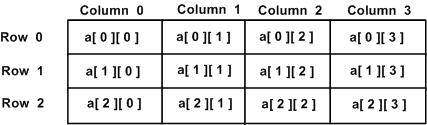
Where type can be any valid C data type and arrayName will be a valid C identifier. A two dimensional array can be think as a table which will have x number of rows and y number of columns. A 2-dimentional array a which contains three rows and four columns can be shown as below:
Two Dimensional Arrays in C Thus, every element in array a is identified by an element name of the form a[ i ][ j ], where a is the name of the array, and i and j are the subscripts that uniquely identify each element in a.

Initializing Two-Dimensional Arrays:

Multidimensionalarrays may be initialized by specifying bracketed values for each row. Following is an array with 3 rows and each row have 4 columns.
int a[3][4] = {  
 {0, 1, 2, 3} ,   /*  initializers for row indexed by 0 */
 {4, 5, 6, 7} ,   /*  initializers for row indexed by 1 */
 {8, 9, 10, 11}   /*  initializers for row indexed by 2 */
};
The nested braces, which indicate the intended row, are optional. The following initialization is equivalent to previous example:
int a[3][4] = {0,1,2,3,4,5,6,7,8,9,10,11};

Accessing Two-Dimensional Array Elements:

An element in 2-dimensional array is accessed by using the subscripts ie. row index and column index of the array. For example:
int val = a[2][3];
The above statement will take 4th element from the 3rd row of the array. You can verify it in the above diagram. Let us check below program where we have used nested loop to handle a two dimensional array:
#include <stdio.h>
 
int main ()
{
   /* an array with 5 rows and 2 columns*/
   int a[5][2] = { {0,0}, {1,2}, {2,4}, {3,6},{4,8}};
   int i, j;
 
   /* output each array element's value */
   for ( i = 0; i < 5; i++ )
   {
      for ( j = 0; j < 2; j++ )
      {
         printf("a[%d][%d] = %d\n", i,j, a[i][j] );
      }
   }
   return 0;
}
When the above code is compiled and executed, it produces following result:
a[0][0]: 0
a[0][1]: 0
a[1][0]: 1
a[1][1]: 2
a[2][0]: 2
a[2][1]: 4
a[3][0]: 3
a[3][1]: 6
a[4][0]: 4
a[4][1]: 8
As explained above, you can have arrays with any number of dimensions, although it is likely that most of the arrays you create will be of one or two dimensions.

If you want to pass a single-dimension array as an argument in a function, you would have to declare function formal parameter in one of following three ways and all three declaration methods produce similar results because each tells the compiler that an integer pointer is going to be received. Similar way you can pass multi-dimensional array as formal parameters.

Way-1

Formal parameters as a pointer as follows. You will study what is pointer in next chapter.
void myFunction(int *param)
{
.
.
.
}

Way-2

Formal parameters as a sized array as follows:
void myFunction(int param[10])
{
.
.
.
}

Way-3

Formal parameters as an unsized array as follows:
void myFunction(int param[])
{
.
.
.
}

Example

Now consider the following function which will take an array as an argument along with another argument and based on the passed arguments, it will return average of the numbers passed through the array as follows:
double getAverage(int arr[], int size)
{
  int    i;
  double avg;
  double sum;

  for (i = 0; i < size; ++i)
  {
    sum += arr[i];
  }

  avg = sum / size;

  return avg;
}
Now let us call the above function as follows:
#include <stdio.h>
 
/* function declaration */
double getAverage(int arr[], int size);

int main ()
{
   /* an int array with 5 elements */
   int balance[5] = {1000, 2, 3, 17, 50};
   double avg;

   /* pass pointer to the array as an argument */
   avg = getAverage( balance, 5 ) ;
 
   /* output the returned value */
   printf( "Average value is: %f ", avg );
    
   return 0;
}
When the above code is compiled together and executed, it produces following result:
Average value is: 214.400000
As you can see, the length of the array doesn't matter as far as the function is concerned because C performs no bounds checking for the formal parameters.

Return array from function in C


C programming language does not allow to return an entire array as an argument to a function. However, You can return a pointer to an array by specifying the array's name without an index. You will study pointer in next chapter so you can skip this chapter until you understand the concept of Pointers in C.
If you want to return a single-dimension array from a function, you would have to declare a function returning a pointer as in the following example:
int * myFunction()
{
.
.
.
}
Second point to remember is that C does not advocate to return the address of a local variable to outside of the function so you would have to define the local variable as static variable.
Now consider the following function which will generate 10 random numbers and return them using an array and call this function as follows:
#include <stdio.h>

/* function to generate and return random numbers */
int * getRandom( )
{
  static int  r[10];
  int i;

  /* set the seed */
  srand( (unsigned)time( NULL ) );
  for ( i = 0; i < 10; ++i)
  {
     r[i] = rand();
     printf( "r[%d] = %d\n", i, r[i]);

  }

  return r;
}

/* main function to call above defined function */
int main ()
{
   /* a pointer to an int */
   int *p;
   int i;

   p = getRandom();
   for ( i = 0; i < 10; i++ )
   {
       printf( "*(p + %d) : %d\n", i, *(p + i));
   }

   return 0;
}
When the above code is compiled together and executed, it produces result something as follows:
r[0] = 313959809
r[1] = 1759055877
r[2] = 1113101911
r[3] = 2133832223
r[4] = 2073354073
r[5] = 167288147
r[6] = 1827471542
r[7] = 834791014
r[8] = 1901409888
r[9] = 1990469526
*(p + 0) : 313959809
*(p + 1) : 1759055877
*(p + 2) : 1113101911
*(p + 3) : 2133832223
*(p + 4) : 2073354073
*(p + 5) : 167288147
*(p + 6) : 1827471542
*(p + 7) : 834791014
*(p + 8) : 1901409888
*(p + 9) : 1990469526

Pointer to an Array in C

 It is most likely that you would not understand this chapter until you through the chapter related Pointers in C.
So assuming you have bit understanding on pointers in C programming language, let us start: An array name is a constant pointer to the first element of the array. Therefore, in the declaration:
double balance[50];
balance is a pointer to &balance[0], which is the address of the first element of the array balance. Thus, the following program fragment assigns p the address of the first element of balance:
double *p;
double balance[10];

p = balance;
It is legal to use array names as constant pointers, and vice versa. Therefore, *(balance + 4) is a legitimate way of accessing the data at balance[4].
Once you store the address of first element in p, you can access array elements using *p, *(p+1), *(p+2) and so on. Below is the example to show all the concepts discussed above:
#include <stdio.h>

int main ()
{
   /* an array with 5 elements */
   double balance[5] = {1000.0, 2.0, 3.4, 17.0, 50.0};
   double *p;
   int i;

   p = balance;
 
   /* output each array element's value */
   printf( "Array values using pointer\n");
   for ( i = 0; i < 5; i++ )
   {
       printf("*(p + %d) : %f\n",  i, *(p + i) );
   }

   printf( "Array values using balance as address\n");
   for ( i = 0; i < 5; i++ )
   {
       printf("*(balance + %d) : %f\n",  i, *(balance + i) );
   }
 
   return 0;
}
When the above code is compiled and executed, it produces following result:
Array values using pointer
*(p + 0) : 1000.000000
*(p + 1) : 2.000000
*(p + 2) : 3.400000
*(p + 3) : 17.000000
*(p + 4) : 50.000000
Array values using balance as address
*(balance + 0) : 1000.000000
*(balance + 1) : 2.000000
*(balance + 2) : 3.400000
*(balance + 3) : 17.000000
*(balance + 4) : 50.000000
In the above example p is a pointer to double which means it can store address of a variable of double type. Once we have address in p, then *p will give us value available at the address stored in p, as we have shown in the above example.